Showing posts with label memcache. Show all posts

Tuesday, September 07, 2010

Hashing algos : Consistent Hashing

Hashing is a way of mapping keys to locations. Normally you would hash by using a simple Key%n algorithm - which ensures that keys are mapped evenly across n splits. The problem with this algo is that adding or removing a node (or a split) would require a complete rehash of all the keys. And if you have a huge data set, it is ideally not feasable to rehash and re-distribute the keys.

Consistent hashing is a way of hashing that ensures that adding or removing a slot or node does not change the mapping of keys to slots significantly. When using consistent hashing, only K/n keys need to be remapped on average - where K is the number of keys and n is the number of slots.

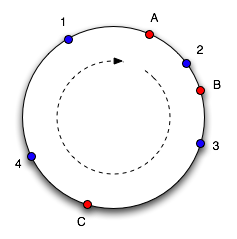
The way this works is that both keys and slots are mapped to edges of a circle. Meaning that all slots are mapped on to a series of angles around a circle. And the bucket where each item should be stored is chosen by selecting the next highest angle which an available bucket maps to. So, each bucket contains resources mapping to an angle between it and the next smallest angle. If a bucket becomes unavailable, the keys being mapped to that bucket get mapped to the next highest bucket (or the next bucket in the circle). So, only keys which were in the bucket which became unavailable is lost. Similarly when a bucket is added, the keys between the new bucket and the next smallest bucket is mapped to the new bucket. Keys which should be associated with the new bucket and were stored previously will become unavailable.

figure 2
figure 1

Here is an example. Objects 1,2,3 and 4 map to slots A,B and C. To find which slot an object goes in, we move around the circle until we find a slot. So here objects 1 and 4 go into slot A, 2 goes into slot B and 3 goes into slot C. If C is removed, object 3 would belong to slot A. If another slot D is added as shown in figure 2, it will take objects 3 and 4 and only leave object 1 belonging to A.

Lets look at a php example which does consistent hasing us.
<?php
class ConsistentHasher
{
  private $nodeDistribution;
  private $virtualNodes;

  // nodeDistribution is the replica count per node.
  public function __construct($nodenames, $nodedistribution)
  {
    $this->nodeDistribution = $nodedistribution;
    $this->virtualNodes = array();

    for($i=0; $i<count($nodenames); $i++)
    {
      $this->addNode($nodenames[$i]);
    }
  }

  // The addNode() function takes a name and creates virtual nodes (or replicas) by 
  // appending the index of the local loop to the node name.
  // The hash value of a virtual node is an MD5 hash, base converted into an integer. 
  // The virtual node is added to a list and sorted by its value so that we ensure 
  // a lowest to highest traversal order for looking up previous and next virtual nodes
  public function addNode($name)
  {
    for($i=0; $i<$this->nodeDistribution; $i++)
    {
      //int representation of $key (8 hex chars = 4 bytes = 32 bit)
      $virtualNodeHashCode = base_convert(substr(md5($name.$i, false),0,8),16,10);
      $this->virtualNodes[$name.$i] = $virtualNodeHashCode;
    }
    asort($this->virtualNodes, SORT_NUMERIC);
  }

  public function dump()
  {
    print_r($this->virtualNodes);
    echo "\n\n";
  }

  public function sortCompare($a, $b)
  {
    if($a == $b)
    {
      return 0;
    }
    return ($a < $b) ? -1 : 1;
  }

  // The removeNode() function takes a name and removes its corresponding virtual nodes 
  // from the virtualNode list.
  // We then resort the list to ensure a lowest to highest traversal order.
  public function removeNode($name)
  {
    for($i=0; $i<$this->nodeDistribution; $i++)
    {
      unset($this->virtualNodes[$name.$i]);
    }
    asort($this->virtualNodes, SORT_NUMERIC);
  }

  // The hashToNode() function takes a key and locates the node where its value resides.
  // We loop through our virtual nodes, stopping before the first one that has a
  // hash greater than that of the key’s hash.
  // If we come to the end of the virtual node list, we loop back to the beginning to 
  // form the conceptual circle.

  public function hashToNode($key)
  {
    $keyHashCode = base_convert(substr(md5($key, false),0,8),16,10);
    $virtualNodeNames = array_keys($this->virtualNodes);
    $firstNodeName = $virtualNodeNames[0];
    $lastNodeName = $virtualNodeNames[count($virtualNodeNames)-1];
    $prevNodeName = $lastNodeName;

    foreach($this->virtualNodes as $name => $hashCode)
    {
      if($keyHashCode < $hashCode)
        return $prevNodeName;

      if($name == $lastNodeName)
        return $firstNodeName;

      $prevNodeName = $name;
    }
    return $prevNodeName;
  }
}

// demo

$hash = new ConsistentHasher(array("node1","node2","node3","node4","node5"),10);
$hash->dump();

$hash->removeNode("node2");
$hash->dump();

$hash->addNode("node6");
$hash->dump();

echo $hash->hashToNode("testing123")."\n";
echo $hash->hashToNode("key1111")."\n";
echo $hash->hashToNode("data4444")."\n";
?>


Here is a library which provides consistent hasing for php
http://code.google.com/p/flexihash/

Memcache is a widely used distributed cache which uses consistent hashing very efficiently to map keys to caching nodes.

References:
http://en.wikipedia.org/wiki/Consistent_hashing
http://www.osconvo.com/post/view/2010/9/1/distributed-hashing-algorithms-by-example-consistent-hashing

Tuesday, April 07, 2009

memcached replication

Wow... finally a solution that provides replication in memcache - repcached.

You can have a look at it repcached.lab.klab.org.

They provide two types of packages

1. a pached memcache source, which can be directly compiled.
2. a patch which can be applied to the memcache source and then compiled.

So, i downloaded the memcached-(version)-repcached-(version).tar.gz source and simply compiled it.

./configure --enable-replication
make
sudo make install


Note : When you enable replication, you cannot do --enable-threads.

I started two instances of memcached on ports 11211 & 11222

jayant@gamegeek:~/php$ memcached -p 11211 -m 64 -x 127.0.0.1 -v
replication: connect (peer=127.0.0.1:11212)
replication: marugoto copying
replication: close
replication: listen

jayant@gamegeek:~/php$ memcached -p 11222 -m 64 -x 127.0.0.1 -v
replication: connect (peer=127.0.0.1:11212)
replication: marugoto copying
replication: start


Now set and get a value on instance on port 11211

jayant@gamegeek:~$ telnet localhost 11211
Trying 127.0.0.1...
Connected to localhost.
Escape character is '^]'.
set hello 0 0 5
world
STORED
get hello
VALUE hello 0 5
world
END


Connect to port 11222 and try getting this value

jayant@gamegeek:~$ telnet localhost 11222
Trying 127.0.0.1...
Connected to localhost.
Escape character is '^]'.
get hello
VALUE hello 0 5
world
END


Try the reverse as well

On 11222
<---snip-->
set key 0 0 5
myval
STORED
get key
VALUE key 0 5
myval
END
<---snip-->


On 11212
<---snip-->
get key
VALUE key 0 5
myval
END
<---snip-->


Suppose the master goes down (in this case lets assume that the memcached on port 11211 goes down). So, we redirect all traffic on port 11222. But later when memcached on port 11211 comes up, the data should be automatically replicated on the new instance. Lets kill the memcache on port 11211 and restart it

On port 11211

Killed
jayant@gamegeek:~/php$ memcached -p 11211 -m 64 -x 127.0.0.1 -v
replication: connect (peer=127.0.0.1:11212)
replication: marugoto copying
replication: start


On port 11222

<---snip-->
replication: close
replication: listen
replication: accept
replication: marugoto start
replication: marugoto 2
replication: marugoto owari
<---snip-->


Lets see if the data has been replicated on port 11211

jayant@gamegeek:~$ telnet localhost 11211
Trying 127.0.0.1...
Connected to localhost.
Escape character is '^]'.
get hello
VALUE hello 0 5
world
END
get key
VALUE key 0 5
myval
END


Bingo...
Please share your experience if you have tried it on a live scenario with large number of sets and gets.

Thursday, February 08, 2007

memcache

Something new, something exciting, something which makes your brain churn... Thats what this blog is all about...

Hmm, so what are we to explore today...

Every machine has some amount of RAM where the OS/programs store frequently accessed data. Have you ever tried storing arrays in memory so that you can access it very frequently. You might have. Even i have done a similar stuff. Storing a binary tree in memory as doubly linked list - so that parsing of the tree becomes fast.

Here is something to ponder over known as memcache. Defined as "A high performance, distributed memory object caching system". You can get it here http://www.danga.com/memcached/

How does this work.. Well, firstly just download the tar.gz source file. Untar and compile it. A simple ./configure , make and make install would do.

So you will have the "memcached" binary ready. Then all you have to do is run the memcached binary in daemon mode and assign it some amount of memory where it can store data. Just do a memcached -h and it will list you all the available options

[jayant@jayant memcached-1.2.1]$ ./memcached -h
memcached 1.2.1
-p TCP port number to listen on (default: 11211)
-U UDP port number to listen on (default: 0, off)
-s unix socket path to listen on (disables network support)
-l interface to listen on, default is INDRR_ANY
-d run as a daemon
-r maximize core file limit
-u assume identity of (only when run as root)
-m max memory to use for items in megabytes, default is 64 MB
-M return error on memory exhausted (rather than removing items)
-c max simultaneous connections, default is 1024
-k lock down all paged memory
-v verbose (print errors/warnings while in event loop)
-vv very verbose (also print client commands/reponses)
-h print this help and exit
-i print memcached and libevent license
-b run a managed instanced (mnemonic: buckets)
-P save PID in , only used with -d option
-f chunk size growth factor, default 1.25
-n minimum space allocated for key+value+flags, default 48


To start memcached in daemon mode with 128 MB RAM, which listens on localhost port 11211 the following command would need to be run

memcached -d -m 128 -l 127.0.0.1 -p 11211

using the options available above, you can configure memcached as per your needs.

So now the server is up and running and you need to use clients to connect and store data over there. For that there are apis available with different languages which allow you to connect to memcached daemon and store/retrieve variables, arrays and objects from it. APIs for perl, python, ruby, java, C# and C are available on the website.

Since i generally do work on php, i wanted an API for php. Well for that the simplest way to install a memcache API for php is by running the following command as root

pecl install memcache

It will automatically download, compile and install the memcache API for php.

Cool, so now we are ready. We have the server running and the client API ready. All we need to do now is build a program which puts and gets information from memcache. I will stick to php for this. http://in.php.net/manual/en/ref.memcache.php lists the functions available with memcached. I wont be giving you a detailed program on how to use memcached api. But just for an idea sake...

You will have to connect to the memcached daemon using the memcache_connect function and then use the memcache_add, memcache_get, memcache_set and memcache_delete to add, retrieve, update and delete objects from the memcachd daemon.

Points to ponder upon:

1. Memcache is very fast. It uses the libevent to scale to any number of open connections.
2. You can start any number of memcached servers on different machines. Different instances of the server do not replicate data across each other. The client api uses the different servers to create a pool and distribute and store data among them.
3. LiveJournal.com uses memcache on a major basis for serving dynamic pages. It helped them reduce the page load times and also reduce database load by a major extent.
4. Memcache does not allow you to store objects which are language independent. So if you use php API to store an object, you cannot use java API to extract the object. Well, even if you extract it, you wont be able to figure out the object - it would be incomprehensible.

If you can figure out a way to serialize all objects of different languages in a well defined manner, then the same object could be stored and accessed by different languages from memcached. This should make things much simpler.